

Run Assessment
SWAO supports five assessment types, each targeting a different subject. Two are available today; three are on the roadmap.
Access from the TUI main menu by pressing 3, then select the assessment type.
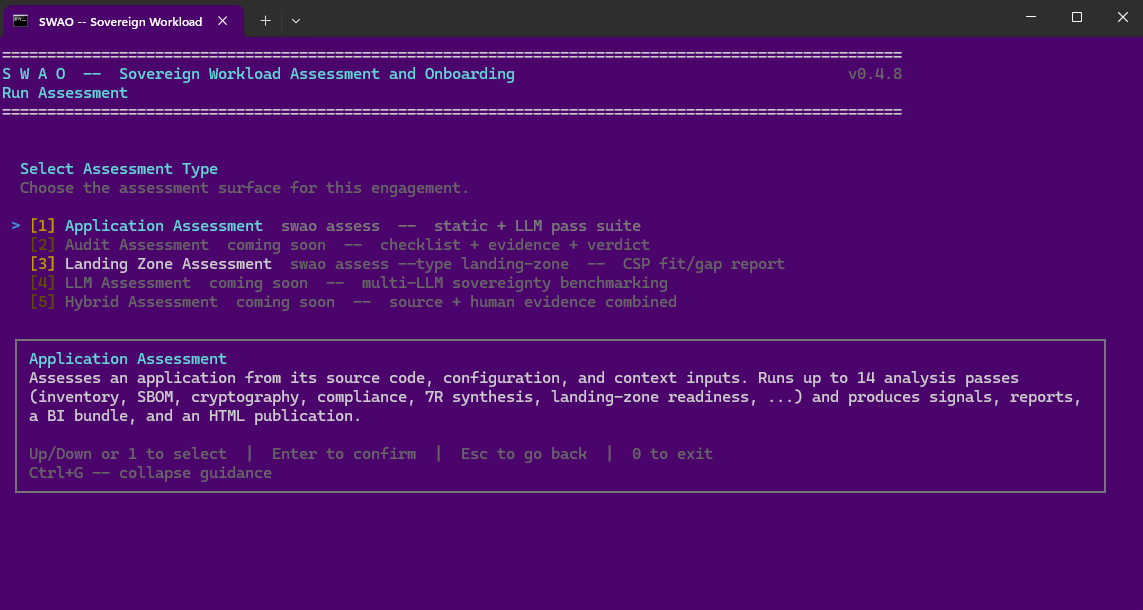
| # | Assessment type | Status | Subject |
|---|---|---|---|
| [1] | Application Assessment | Available | Cloud application source code |
| [2] | Audit Assessment | Coming soon | Human-led compliance audit |
| [3] | Landing Zone Assessment | Available | Cloud infrastructure configuration |
| [4] | LLM Assessment | Coming soon | AI model sovereignty benchmarking |
| [5] | Hybrid Assessment | Coming soon | Combined source + human evidence |
How assessment works
Every assessment type shares the same pipeline:
- Input reading -- SWAO reads your application source, configuration files, and any context documents you have placed in the ingestion folder.
- Pass execution -- a sequence of analysis passes runs against the input. Some passes use static analysis (deterministic, no LLM required); others invoke your configured LLM to derive findings that require language understanding.
- Signal emission -- each pass emits signals: structured findings with a signal ID, severity, compliance control mapping, rationale text, and evidence references.
- Output generation -- signals are aggregated into the Workspace Signal Pack (WSP), from which SWAO generates reports, the BI export bundle, and the HTML publication.
All outputs are stored in apps/<app-id>/wsp/ and can be regenerated at any time from the same signal set without re-running the assessment.
After assessment
Once assessment completes, use the other TUI menu items to turn results into deliverables:
- [4] Generate Report -- text and Markdown audit report
- [5] Publish HTML -- self-contained HTML publication for the client
- [6] Export BI -- star schema bundle for Power BI or Tableau