

Publish HTML
Publish HTML generates a self-contained HTML publication from the latest assessment results. The file is under 2 MB, opens in any browser, works fully offline, and can be emailed directly to the client without any SWAO installation on their side.
Access from the TUI main menu by pressing 5.
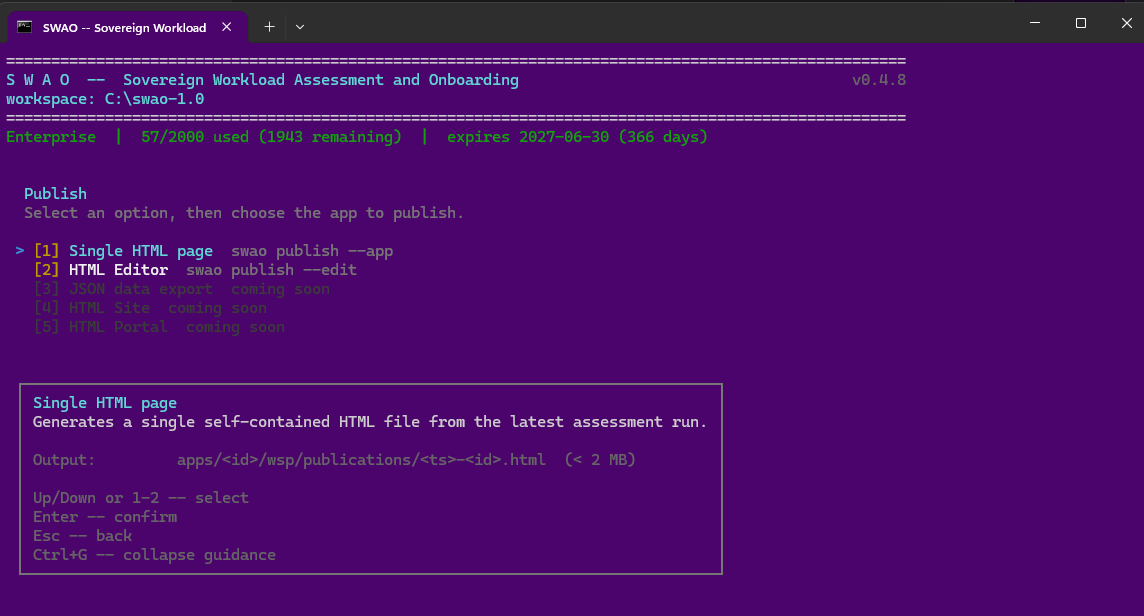
Publication options
The Publish screen offers two active paths:
[1] Single HTML page -- swao publish --app <id>
Generates a single .html file containing the complete assessment publication. The file is written to apps/<id>/wsp/publications/<timestamp>-<id>.html.
The publication includes:
- Executive summary -- 7R migration verdict, coverage score, and top risks in a format that a senior stakeholder can read in five minutes.
- Compliance pages -- controls grouped by framework, each with verdict, rationale, and evidence links.
- Risk register -- interactive table sortable by score, category, and likelihood.
- Signals explorer -- every signal with full rationale and evidence, searchable by ID or keyword.
- Auditor view -- signal-level false-positive analysis and rationale coverage metrics.
- Run statistics -- pass timing, LLM token usage, and cost summary.
Persona views: readers can switch between four views in the publication -- Executive, Technical, Auditor, and DPO -- each filtering to the signals and controls most relevant to that role.
[2] HTML Editor -- swao publish --edit
Opens an interactive browser-based editor where you can customise the publication before saving the final file. Use the editor to:
- Add consultant commentary and engagement context.
- Suppress signals that have been accepted as false positives.
- Adjust the executive summary wording for the specific audience.
- Preview persona views before delivery.
Changes are saved back to the same workspace-side source -- re-publishing at any time recreates the HTML from the current editor state.
Coming-soon options
| Option | Planned |
|---|---|
| JSON data export | Structured export of the publication data model |
| HTML Site | Multi-page static site with search and navigation |
| HTML Portal | Multi-tenant portal with application and portfolio views |
Sharing the publication
The HTML file is entirely self-contained -- no external dependencies, no server required. You can:
- Email it as an attachment.
- Upload it to a SharePoint or Teams document library.
- Store it in the engagement archive alongside the audit evidence.
The file name includes a timestamp (<yyyy-mm-dd-HHmm>-<app-id>.html) so multiple publications from different assessment runs are kept as a version history in the publications folder.