

Health Check
Health Check verifies that every component of your SWAO environment is working correctly before you run an assessment. Run it after setup, after any configuration change, and before a session to confirm the environment is ready.
Access it from the TUI main menu by pressing 2, or from the command line:
swao health-check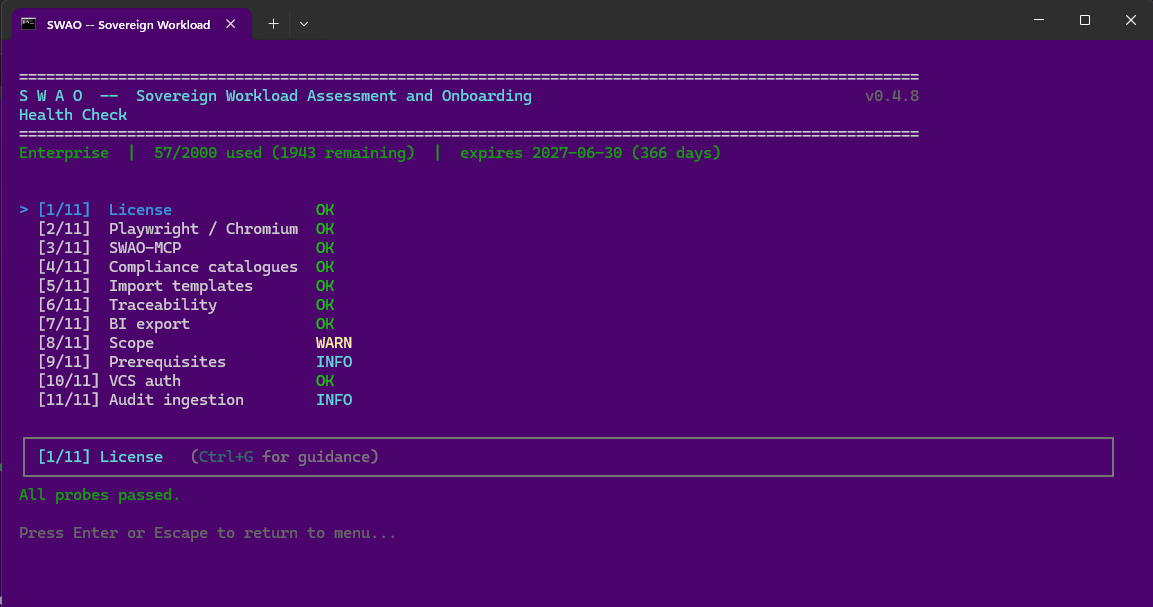
The 11 probes
Health Check runs 11 automated checks and reports one of three statuses for each:
| Status | Meaning |
|---|---|
| OK | Component is configured and working correctly. |
| WARN | Something needs attention before assessment will work as expected. |
| INFO | An optional component is not configured -- assessment continues without it. |
| Probe | What it checks |
|---|---|
| [1/11] Licence | Licence tier (Community / Consultant / Enterprise), usage count, and expiry date. |
| [2/11] Playwright / Chromium | Whether Playwright is installed. Required for PDF report generation and the HTML Editor. |
| [3/11] SWAO-MCP | Whether the SWAO MCP server is registered and reachable. Required for Claude Desktop integration. |
| [4/11] Compliance catalogues | Integrity of all installed framework YAML files. Reports the framework name, contributor, and control count for each one. |
| [5/11] Import templates | Whether Power BI .pbit template files are present in wsp/templates/powerbi/. |
| [6/11] Traceability | Whether assessed applications meet the traceability targets (signal count thresholds that confirm the assessment is substantive). |
| [7/11] BI export | Whether the star-schema export bundle is present and internally consistent (row counts and hashes). |
| [8/11] Scope | Whether Pass 13 (scope coverage) has been run for each application. Scope coverage is emitted by default from v0.4.5+. |
| [9/11] Prerequisites | Whether optional command-line tools are on the PATH (e.g. ssh for key-based repository cloning). |
| [10/11] VCS auth | Whether SWAO can authenticate to the version control hosts configured for your applications. |
| [11/11] Audit ingestion | Whether an audit workspace ingestion folder is configured. Only relevant for Audit Assessment. |
Machine fingerprint
At the bottom of every Health Check output, SWAO displays a machine fingerprint -- a short identifier tied to the hardware running SWAO. This fingerprint is required when requesting a licence key upgrade. Keep a note of it for your records.
Responding to WARN and INFO
Each probe that does not return OK displays guidance text explaining what needs to be done. You can press Ctrl+G in the TUI view to expand the guidance box for the selected probe.
Common resolutions:
- Playwright WARN -- run
npx playwright install chromiumor use the Workspace Setup wizard (Step 6). - VCS auth WARN -- re-run Workspace Setup Step 3 (Credentials) to refresh repository credentials.
- Scope INFO -- run
swao assess --app <id>to generate scope coverage for the listed applications. - Audit ingestion INFO -- only relevant if you intend to run an Audit Assessment; safe to ignore otherwise.
"All probes passed" confirms the workspace is ready for assessment.