
How SWAO Works
SWAO analyses a cloud application and produces an auditor-grade assessment report in a single command - or through the guided terminal interface. No external services, no data uploads, no call-home.
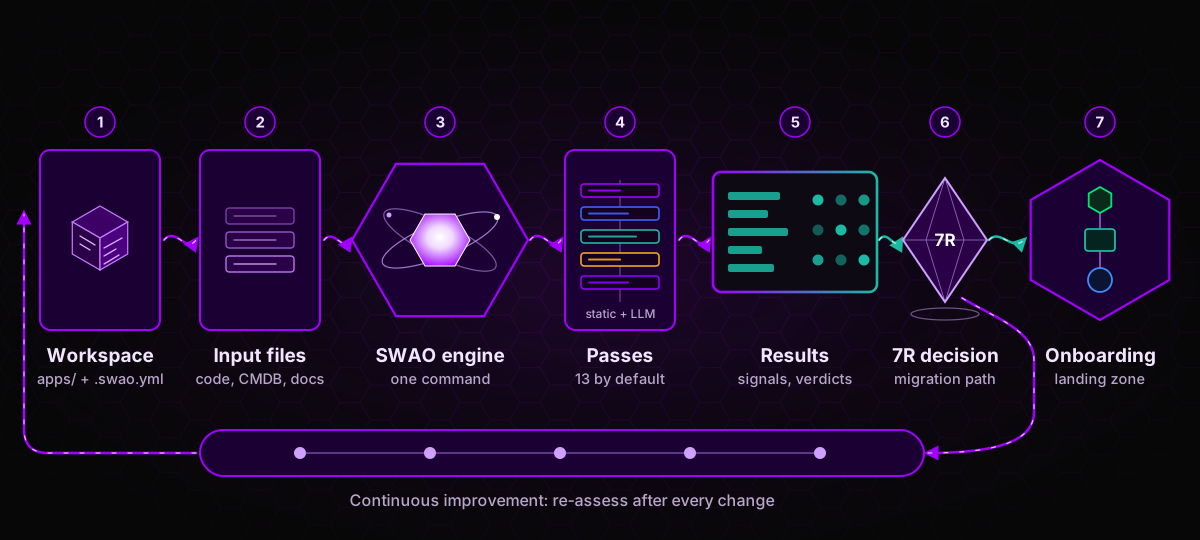 From workspace to onboarding: one engine, 13 default passes and one evidence chain from input to migration decision.
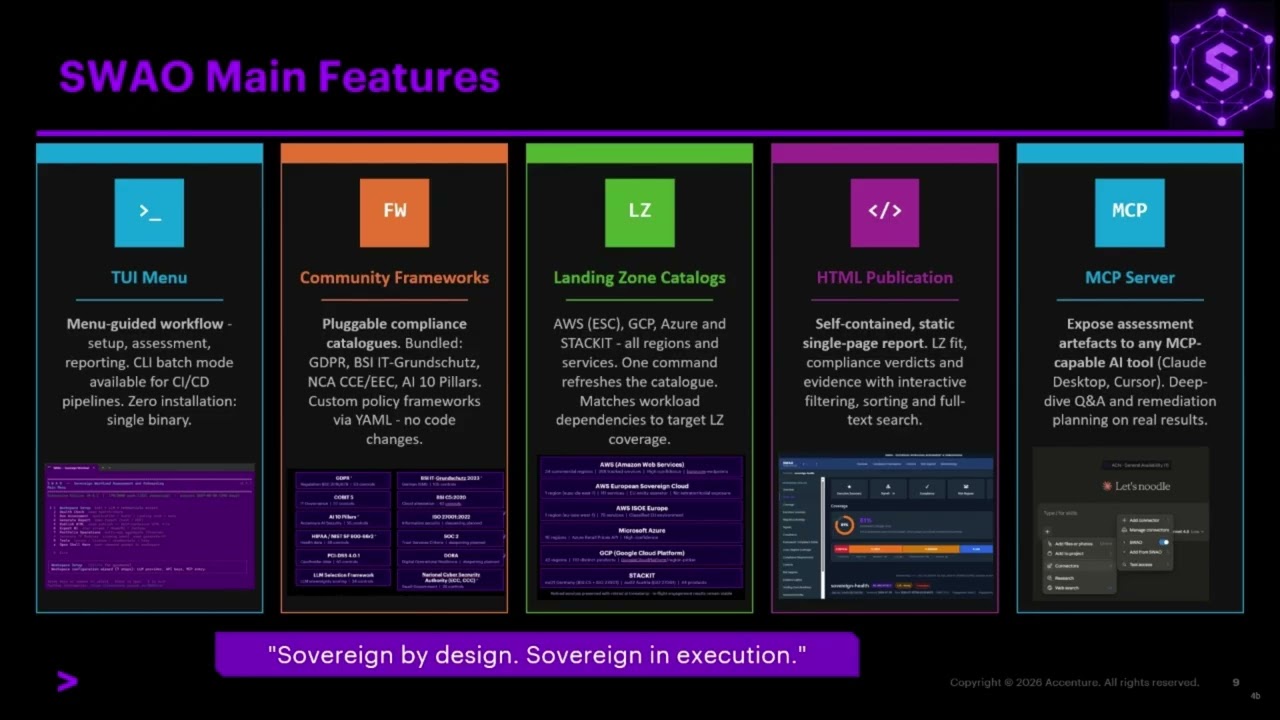
The guided interface (TUI)
When you run swao without arguments, the terminal user interface opens. It walks you through every step without needing to remember commands.
Main menu
SWAO -- Sovereign Workload Assessment and Onboarding
Community  v0.11.2

  1  Workspace Setup       init + LLM + credentials wizard
  2  Health Check          swao health-check
  3  Run Assessment        Application / Landing Zone / LLM + more
  4  Generate Report       swao report (text / PDF)
  5  Publish HTML          swao publish -- self-contained HTML file
  6  Export BI             star schema / PowerBI / Tableau
  7  Portfolio Operations  multi-app aggregate (Enterprise)
  8  Generate TF Modules   swao generate-tf
  9  Tools                 lenses / licence / credentials / help
  0  Exit
Use the arrow keys or type the number to navigate.
See also: Sample Gallery - TUI Main Menu
Setup Wizard
If this is your first time, start here. The wizard asks:
- Workspace - engagement name, client code, owner, and the workspace directory.
- LLM provider - Anthropic Claude, OpenAI, Amazon Bedrock Gateway, a local Ollama model, or a deterministic stub for offline use.
- Credentials - the API key for the chosen provider, stored in the SWAO credential store.
- Health check - a first run of the pre-flight checks.
- Claude Desktop and 6. Playwright - optional integrations (MCP server, browser for dynamic analysis).
- Ready - a summary of the next steps.
The wizard creates a ready-to-use workspace folder on disk. New workspaces contain the four demo frameworks (GDPR_DEMO, AI_10_PILLARS_DEMO, NIST_SP_800_66R2_DEMO, BSI_GRUNDSCHUTZ_2023_DEMO). Copy more into the workspace at any time with swao framework install <ID>; swao framework list shows the IDs. You choose the frameworks for each app when you run the assessment.
Health Check
Before running an assessment, select Health Check (item 2) to verify that the workspace is healthy. Each probe reports ok or a specific action to take:
| Probe | What it checks |
|---|---|
| Licence | Edition detected and valid |
| Playwright | Dynamic analysis readiness |
| MCP | Model Context Protocol server configuration |
| Compliance catalogues | Framework files present and consistent |
| Import templates | Ingestion folder structure |
| Traceability | Audit-grade signal fields enabled |
| BI export bundle | Previous export integrity |
See also: Sample Gallery - Health Check
Run Assessment
Select 3. Run Assessment from the main menu. SWAO asks which assessment type to run:
| Option | What it does |
|---|---|
| Application Assessment | Analyses your application source code |
| Service Portfolio Assessment | Assesses third-party, COTS, and SaaS applications from a spreadsheet intake, without source code |
| Landing Zone Catalog Assessment | Checks a cloud provider's service catalogue and region against your sovereignty requirements |
| LLM Assessment | Benchmarks LLM providers against sovereignty criteria |
Select an assessment type, confirm, and SWAO runs automatically. A live progress bar shows each pass as it completes.
The assessment pipeline
An Application Assessment runs 13 analysis passes by default. Each pass is independent and auditable; the numbering follows the passes overview.
| Pass | What it does (business view) |
|---|---|
| 01 Inventory | Maps the languages, frameworks, and dependencies in your codebase |
| 02 State analysis | Identifies stateful components: databases, session storage, caches |
| 03 Data classification | Finds personal data fields, PII columns, residency markers |
| 04 Context ingestion | Reads your CMDB, workshop transcripts, and architecture docs |
| 05 SBOM | Checks dependencies for known vulnerabilities, maintenance, and end-of-life runtimes |
| 06 Twelve-factor | Checks cloud-readiness against the 12-factor application standard |
| 07 Egress analysis | Maps outbound calls and third-party data transfers |
| 08 Cryptography | Reviews hashing, token signing, and encryption at rest |
| 09 Migration synthesis | Synthesises a 7R verdict (Retire, Retain, Rehost, Replatform, Refactor, Re-architect, Repurchase) |
| 10 Dynamic analysis | Browser crawl of the running application (needs a crawl target) |
| 11 Compliance evaluation | Rates the controls of the active compliance frameworks |
| 12 Operational blocks | Rates the maturity of eight blocks, from observability to disaster recovery |
| 13 Scope | Checks which known blind spots the evidence covers |
Pass 00 (INGEST) prepares the supplied documents before the first pass. Pass 14 (malware and secret scanning) and Pass 23 (landing zone readiness, --lzr) run only on request. The run order differs slightly from the numbering: compliance, synthesis, and the block ratings run last so that they see the results of all other passes.
Passes 01 and 02 are deterministic, no LLM required. Passes 03, 04, 09, 11, and 12 call the LLM to classify data and to produce human-readable rationale on signals, compliance verdicts, and block ratings.
The HTML publication
After an assessment, SWAO generates a self-contained HTML file you can open in any browser, email to a client, or use offline in an air-gapped environment.
The publication includes:
- Executive view - 7R verdict, coverage score, top risks in plain language.
- Technical view - all signals with derivation, evidence links, and pass breakdowns.
- Compliance view - per-framework control table with outcome and rationale.
- Auditor view - per-control audit record: outcome, rationale, evidence, assessor, timestamp. Filterable by framework and verdict.
- Evidence gallery - screenshots and artefacts from the assessment, embedded for offline delivery.
- Run history - duration, LLM cost, files assessed, per-pass breakdown.
The HTML file contains everything. No server, no internet connection, no account needed to open it.
To generate the publication:
swao publish --app my-app
# opens: wsp/publications/latest/index.html
See also: Sample Gallery - Publish HTML TUI and PowerBI dashboard screenshots
MCP integration
SWAO can connect to Claude AI via the Model Context Protocol (MCP). Once connected, you can ask Claude questions about your assessment findings in natural language - without leaving your conversation.
Example questions you can ask Claude after connecting:
- "What are the top compliance gaps for this application?"
- "Summarise the landing zone fit/gap findings."
- "Show me all signals assessed by the rule engine."
- "What is the 7R migration verdict and why?"
How to connect
- Run
swao health-check(or select 2. Health Check in the TUI) - the MCP probe shows the server path. - In Claude Desktop: Settings > Developer > MCP Servers > Add. Paste the path.
- Restart Claude Desktop.
See also: Sample Gallery - MCP connector setup and MCP challenge in Claude
SWAO starts the MCP server automatically when Claude connects. All assessment data stays on your machine. MCP exposes query tools, not the raw files; a few tools also run SWAO actions in the workspace (swao_assess and the service tools swao_service_init, swao_service_research_run and swao_service_export).
Available tools via MCP:
| Tool | What it does |
|---|---|
swao_assess | Trigger a new assessment from within Claude |
swao_report | Get a structured summary of the latest assessment |
swao_signal_detail | Look up a specific signal by ID |
swao_signals | List the signals of the latest assessment |
swao_lz_fit | Get the landing zone fit/gap summary |
swao_frameworks_list | List the community frameworks available in the workspace |
For a workspace scaffolded with swao service init (Service Portfolio Assessment), 11 further tools expose the service results. The first eight only read; the last three run the matching swao service command and write to the workspace.
| Tool | What it does |
|---|---|
swao_service_portfolio | One row per application or service app from wsp/portfolio-summary.json (combined view: assessment_type, TIME, risk, evidence, wave, end of life, CVE counts), with filters and sorting |
swao_service_app | Everything about one service app: intake fields, classification, cost estimate, integrations, scores, runs, research and binary summary |
swao_service_research | Research stubs of one app (CVE, end of life, VirusTotal and the LLM topics) |
swao_service_waves | Migration waves and integration hubs of both app types, each app with assessment_type and the not-assessed mark |
swao_service_vendors | Vendor consolidation groups with opportunity score and tier |
swao_service_delta | Latest delta report against the previous snapshot |
swao_service_scaffold | Scaffold summary: rows read, apps, clusters, unclassified apps, recognised columns |
swao_service_runs | Service runs per app with their status and the latest usable run |
swao_service_init | Runs swao service init (writes to the workspace) |
swao_service_research_run | Runs swao service research (writes to the workspace) |
swao_service_export | Enterprise: runs swao service export (portfolio workbook and star schema) |
Intake contact, phone and e-mail are reported as presence flags only. Full reference: MCP Integration, section 4.1.
PowerBI dashboards
The BI export bundle produced by every assessment is a set of 17 CSV tables in a star-schema layout. Any BI tool can load it.
For Power BI Desktop users, SWAO ships pre-built templates in your workspace at wsp/templates/powerbi/:
| Template | Tier | Pages |
|---|---|---|
swao-report.pbit (single app) | Enterprise | Overview, Compliance, Signals, Risks, Auditor, Run Stats |
swao-portfolio.pbit (multi-app) | Enterprise | Portfolio Overview, App Heatmap, Compliance, Risk & 7R, Wave Sequencing, Auditor Roll-up |
To open a template:
- Open the
.pbitfile in Power BI Desktop. - When prompted for
SWAOExportPath, paste the path to thestar/folder inside your latest assessment export. - Click Load. The dashboard refreshes with your data.
For step-by-step instructions on customising the template, see the Export BI runbook.
What stays on your machine
SWAO is file-only by design:
- No telemetry. No usage data sent anywhere.
- No hosted endpoint. The assessment engine runs entirely on your machine.
- No call-home. The binary does not check for updates or send error reports.
- LLM calls go directly from your machine to the provider you configured (Anthropic, OpenAI, Amazon Bedrock Gateway, or Ollama). SWAO does not proxy or store them.
- The HTML publication, BI export, and PowerBI dashboard are local files. Share them only when and how you choose.