
5. Publish HTML
Select option 5 from the main menu (or run swao publish) to generate a self-contained HTML file from your assessment results. The file works offline, in air-gapped environments, and as an email attachment: no server required.
What the publication contains
| View | Audience | Content |
|---|---|---|
| Executive summary | Programme sponsor / CISO | 7R verdict, coverage score, top risks |
| Technical findings | Architect / developer | All signals with rationale and evidence links |
| Compliance view | DPO / compliance officer | Framework-specific control table |
| Auditor view | External / internal auditor | Audit log with timestamps and assessor identity |
| Evidence gallery | Reviewer | Screenshots and artefacts from dynamic analysis |
| Run log | Consultant | Duration, LLM cost, pass breakdown |
The publication includes a full-text search index built at generation time: no external search service.
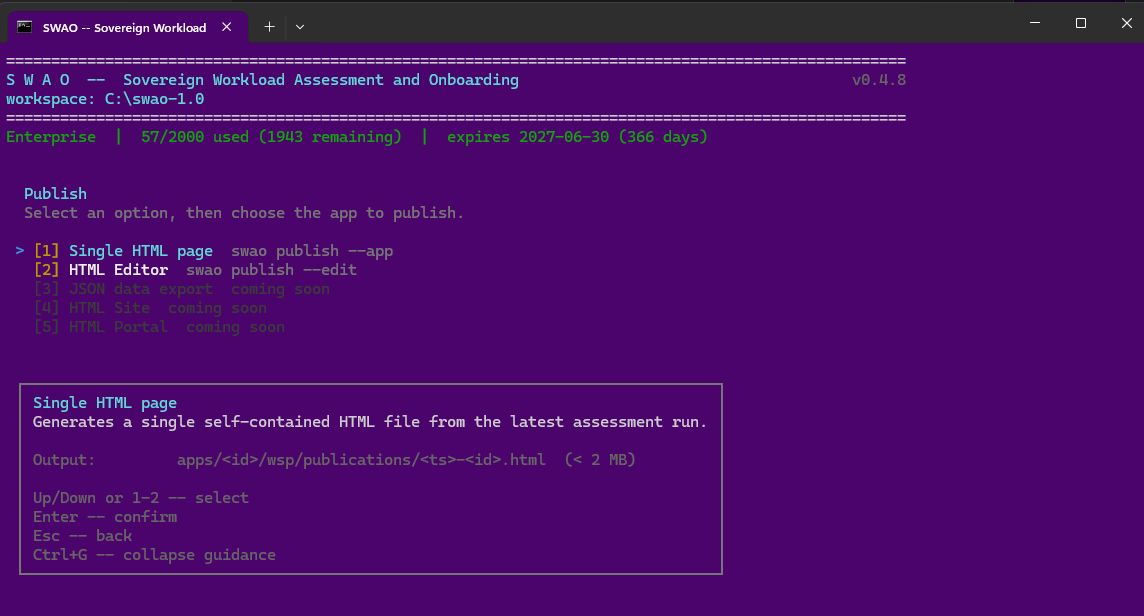 The Publish screen in the terminal interface (menu option 5): a single self-contained HTML page, or the HTML Editor (Enterprise). Captured with an earlier SWAO version.
Sample publications
Three HTML publications for the Sovereign Health demo application, rendered from the public repository:
| Type | Description | Link |
|---|---|---|
| Application Assessment | Full GDPR and BSI C5 compliance report for a fictitious patient-management application. Signal findings, risk register and 7R migration strategy, all sourced from static and LLM analysis. | Open live report |
| Landing Zone Assessment | Fit/gap analysis comparing EU sovereign and hyperscaler cloud providers for the Sovereign Health application. Shows which providers meet data-residency and compliance requirements. | Open live report |
| LLM Assessment | Multi-LLM sovereignty benchmarking report. Evaluates language models against data-residency, GDPR and BSI C5 requirements, with per-model verdicts and sourced rationale. | Open live report |
CLI
swao publish --app my-app
# Output: wsp/publications/latest/index.html
Engagement Hub
The workspace Engagement Hub is a portfolio view across every assessed app, published to wsp/publications/engagement-hub.html. It gives an engagement a single entry point with:
- Portfolio KPIs per assessment type: apps, assessed, portfolio risk, end of life, blockers and critical findings.
- Per-app tiles showing the 7R migration strategy and its source (assessed, derived from TIME, or analyst), the TIME quadrant, risk and health, coverage and end-of-life status, each linking to the app's publications.
- Charts (CSS only): TIME, 7R, end of life, risk distribution, findings by severity and compliance per framework.
- Landing-zone fit per target, and estimated monthly cloud cost for services.
- A sortable, filterable table: filter by assessment type first, then TIME, 7R, end of life and wave, plus a free-text search.
The hub is rebuilt automatically after every publication. Rebuild it on demand with swao publish --portfolio, or from the Publish HTML screen entry "Portfolio Engagement Hub (Enterprise)".
swao publish --portfolio
# Output: wsp/publications/engagement-hub.html
Edition
Consultant EnterpriseAvailable in Consultant and Enterprise editions. The HTML Editor (swao publish --edit) and the Engagement Hub (swao publish --portfolio) are Enterprise only.
See also: Generate Report | Export BI