
7. Portfolio Operations
Portfolio Operations (option 7 in the main menu) aggregate assessment results across multiple applications in a single workspace. Available in the Enterprise edition Enterprise.
What portfolio mode provides
| Capability | Description |
|---|---|
| Multi-app assessment | Run assessments across all apps in a workspace in sequence or in parallel |
| Aggregated risk register | Cross-application finding list, deduplicated and ranked |
| Portfolio compliance matrix | Framework coverage across every assessed app |
| Migration wave planning | Dependency-aware sequencing for phased cloud migration |
| Portfolio Power BI dashboard | swao-portfolio.pbit with heatmap and wave views (portfolio data: Enterprise) |
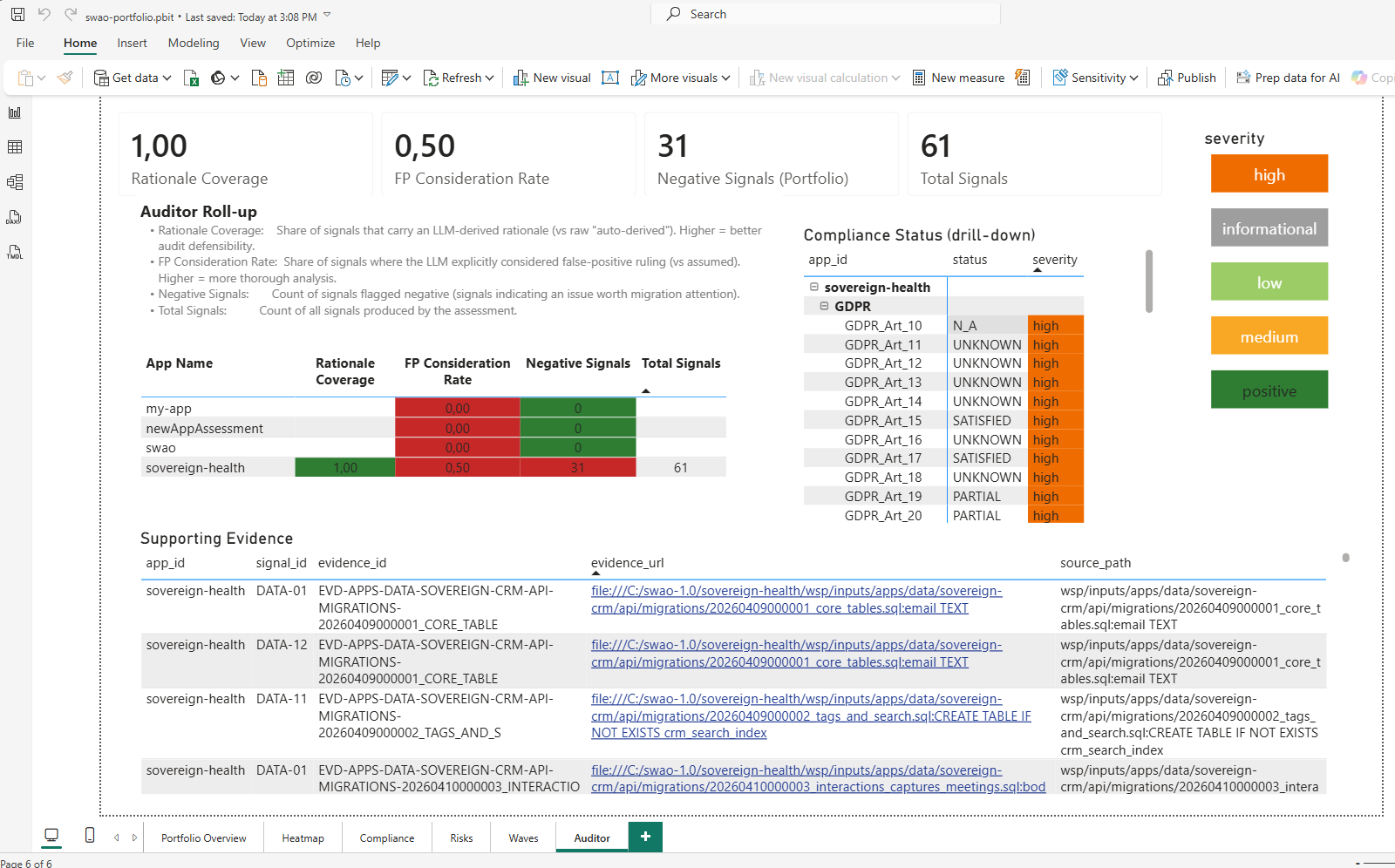 The Auditor roll-up of
swao-portfolio.pbit for a demo workspace with four apps: coverage per app, per-control status and the supporting evidence side by side.
CLI
# Assess all apps in the workspace
swao assess --portfolio

# Export aggregated BI bundle
swao export --portfolio --formats csv,xlsx

# Open the portfolio dashboard
# Open wsp/templates/powerbi/swao-portfolio.pbit in Power BI Desktop
Combined portfolio view (application and service apps)
One engagement workspace can hold application assessments (swao assess --app <id>) and Service Portfolio Assessment apps (swao service init) side by side. wsp/portfolio-summary.json is the combined view over both: every app is listed once with assessment_type: application or assessment_type: service.
| Application apps | Service apps | |
|---|---|---|
| Evidence | Latest usable application run (7R verdict, Pass 01 / 05 runtime end of life and dependency CVE lookup, negative critical and high findings, compliance outcomes, landing zone verdict) | Intake, research stubs, latest service run |
| TIME | From the 7R verdict (Retire: Eliminate; Retain: Tolerate; Rehost, Relocate, Replatform, Repurchase: Migrate; Refactor: Invest), see SWAO_APM framework | SWAO_APM TIME rules |
| Not assessed | No usable application run | No service assessment run |
Both types share one TIME distribution, one ranked list, one migration wave plan, one integration graph and one vendor consolidation. The headline figures cover assessed apps of both types; by_assessment_type in the summary gives the same figures per type. The summary is rebuilt by swao service research, a service assessment and swao service export; run one of them after new application assessments.
Where the type shows:
- MCP:
swao_service_portfolio(filterassessment_type),swao_service_app,swao_service_wavesandswao_service_vendorsreturn both types with theassessment_typefield. - Enterprise workbook and star schema (
swao service export): anAssessment Typecolumn anddim_service_app.assessment_type, see Export BI. - Migration wave report (
wsp/reports/migration-waves-*.md/.csv) and the engagement hub portfolio blocks: application apps carry a type column or an Application mark.
Edition
Portfolio operations require Enterprise. The Community and Consultant editions can run individual assessments in the same workspace folder but do not aggregate results. The per-app star schema (swao export) is available in every edition.
See also: Export BI | Features & Editions