
1. Workspace Setup
The Workspace Setup wizard runs when you select option 1 from the SWAO main menu. It initialises your engagement folder and writes a .swao.yml configuration file in one guided flow.
What the wizard configures
| Step | What it does |
|---|---|
| Workspace | Engagement name, client code, owner, and directory; creates the engagement folder structure |
| LLM provider | Configures the AI provider: Anthropic, OpenAI, Amazon Bedrock Gateway, Ollama |
| Credentials | Stores API keys and vault references via swao credential set |
| LZ targets | Optional: pick landing zone catalogue providers, then per provider one or more geographies (for example europe, shown with its default region) or region ids. Writes assessment.landing_zone.targets to the workspace .swao.yml; every application run then fits these targets. Press S to skip |
| Health check | Runs the pre-flight probes once |
| Claude Desktop, Playwright | Optional integrations: MCP server configuration and the browser for dynamic analysis |
| Test code | How assessments treat test code: analyse all code (default), analyse all code and mark test-code findings, or exclude test code. Writes assessment.test_code.mode to the workspace .swao.yml. Press Esc to keep the current setting |
New workspaces contain four demo frameworks. Further community frameworks are copied into the workspace with swao framework install <ID> and chosen per app when you run an assessment.
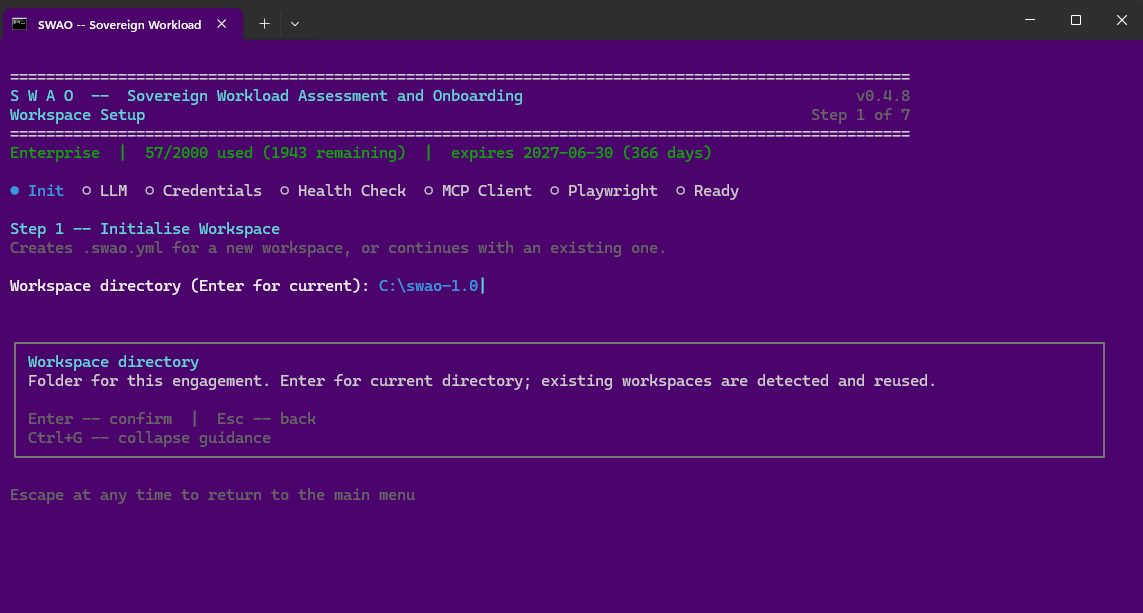 The Workspace Setup wizard at step 1 (Init). The progress dots show the remaining steps. Captured with an earlier SWAO version; the current wizard also offers the LZ targets step.
CLI equivalent
swao init my-engagement --name app-crm-01
swao credential set anthropic-api-key <your-api-key>
swao framework install GDPR
swao regime-select --app app-crm-01 --regimes GDPR
# LZ targets: pass them per run, or set assessment.landing_zone.targets in .swao.yml
swao assess --app app-crm-01 --lz-cat-targets azure:europe,stackit:eu01
An app .swao.yml and --lz-cat-targets override the workspace targets. A geography resolves to its default region at run time; the application run records requested, resolved and skipped targets in run-status.json, and a skipped target marks the run as partial. The text report (swao report) lists them under Landing Zone Catalogue Fit.
Test code
By default SWAO analyses test code like production code. Mixed code bases can keep test code out of the findings:
assessment:
  exclude_test_code: true      # short form; false (default) analyses everything
  # or the extended form:
  test_code:
    mode: tag                  # include (default) | tag | exclude
    extra_patterns: ["systemtest/**", "**/e2e/**"]
keep_patterns: []include: everything is analysed; results are unchanged.tag: everything is analysed; findings that rest only on test code are markedtest_codeand lowered one severity step (the original severity is kept).exclude: test files are not read. The secret scan still covers them: a password in test code stays a finding, marked as test code.
Test code is recognised by built-in rules (src/test/, test/, tests/, __tests__/, systemtest/, e2e/, mock/, *.test.ts, *.spec.js, *Test.java, *IT.java, *ITest.java, ...) and by the test folders declared in pom.xml, Gradle source sets and vitest / jest configuration. keep_patterns wins over every rule. An app .swao.yml overrides the workspace setting. The publication's Assessment Scope shows the mode, the test-file count and the marked findings.
After setup
Run a Health Check to verify that all pre-flight probes pass before starting an assessment.
See also: How it works